How it works
kenkeep runs a loop around your AI sessions. Capture and recall happen on their own. You trigger curation, and you decide what to keep.
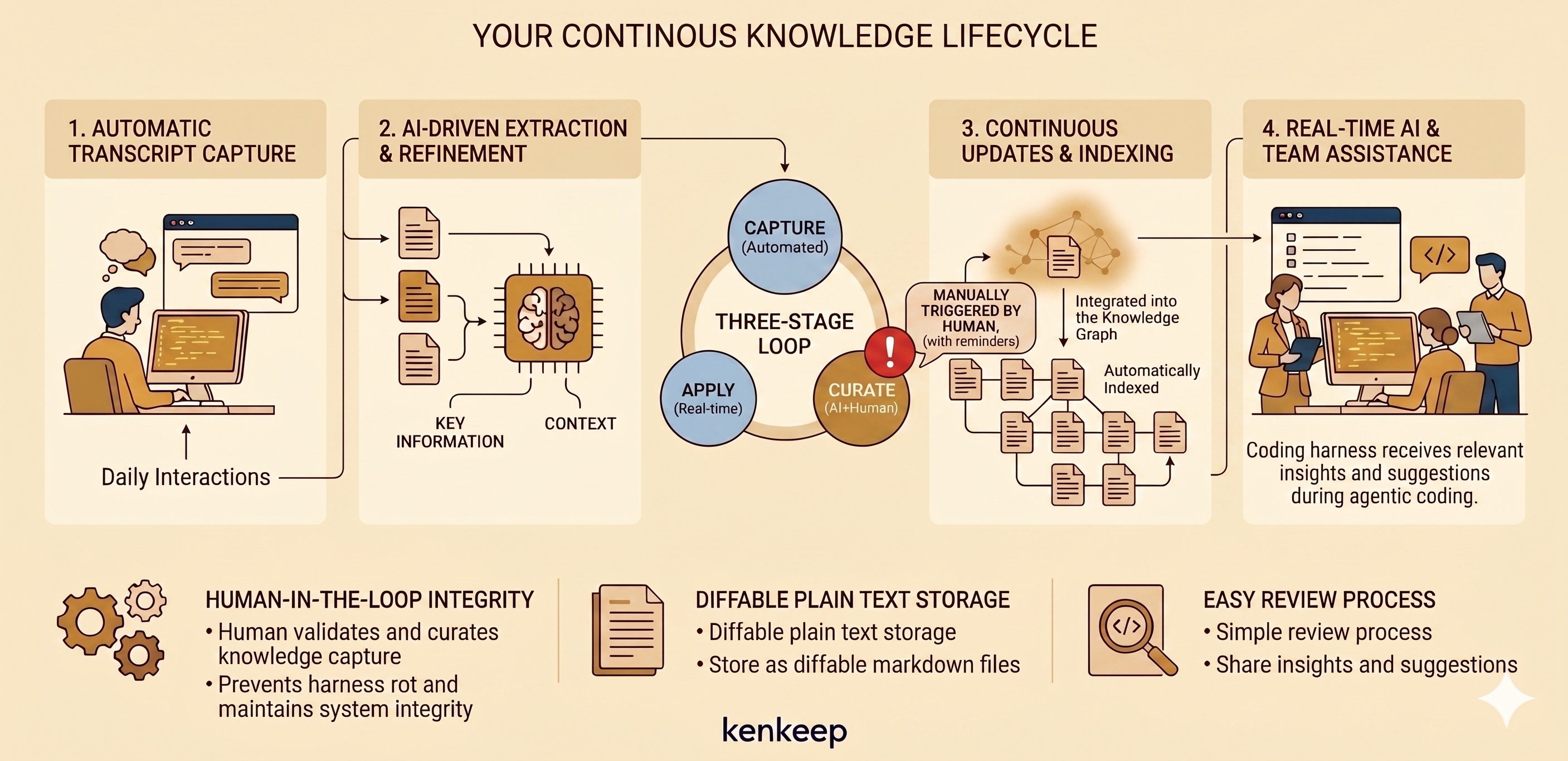
1. Capture (automatic)
When a session ends, a hook saves the transcript to .ai/kenkeep/_sessions/. You don’t run this; it happens on its own. Each harness fires capture on the lifecycle events its runtime emits: Claude on Stop, SessionEnd, and PreCompact; Codex on Stop; Cursor on stop, sessionEnd, and preCompact; OpenCode on session.idle; and GitHub Copilot CLI on sessionEnd and agentStop, reading the per-session events.jsonl transcript under ${COPILOT_HOME:-~/.copilot}/session-state/<sessionID>/.
2. Curate (you start it, the AI does most of the work)
Run /kk-curate (the system nudges you once transcripts pile up). It reads the captured sessions, drafts proposed notes, writes them under .ai/kenkeep/nodes/, then rebuilds the index.md tree (root catalog ENTRY.md) and GRAPH.md.
For a single session that already produced durable knowledge, /kk-session-extract offers the same curation tail on demand: it applies proposal-extract.md to the visible live context, stages a done session log, and curates only that session without waiting for the deferred batch path.
In the same pass that links a note to its neighbors, the curator picks its home folder — the best-fitting existing folder under nodes/, or the nodes/ root when nothing fits. Identity is the note’s id, not its path, so its links hold wherever it lives. Curation only places notes in existing folders; it never creates, splits, or merges them.
When a proposed note contradicts one you already have, the curator never overwrites it silently. It records the conflict, and /kk-curate walks each one with you: accept the new note, reject it, or keep the conflict as a record. This walkthrough is the only way contradictions get resolved.
Rebalance (the final phase of curate)
Curation alone lets the tree go lopsided. The last phase of /kk-curate rebalances it — no second command, no second nudge. A deterministic, LLM-free trigger checks the per-folder metrics with a hysteresis margin (so a borderline note can’t flip a folder back and forth); most runs trip nothing and skip it at zero cost.
When a threshold trips, the LLM reworks the affected branches only: split a folder, split a bloated note, merge a sparse branch, or create a branch for a new topic. A deterministic primitive applies the moves as byte-stable, id-stable renames — split-leaf mints new ids and a redirect — then regenerates the affected index.md nodes and nodes_hash.
3. Review (you decide)
The files under nodes/ are plain markdown. Review them with git diff, then keep with git commit or drop with git restore <path>. These notes shape every future session, so this is the one place a human stays in the loop. After a git restore that drops a note, run npx kenkeep index rebuild so the generated index stops referencing it — committing a nodes/ change instead refreshes the index through the pre-commit hook.
Rebalance moves land in this same diff (act-and-fold), reviewed alongside the note writes. git restore is path-scoped, so you can reject just the moves and keep the writes, or the reverse. Either way, follow a git restore with npx kenkeep index rebuild to resync the generated index with the on-disk tree.
4. Recall (automatic)
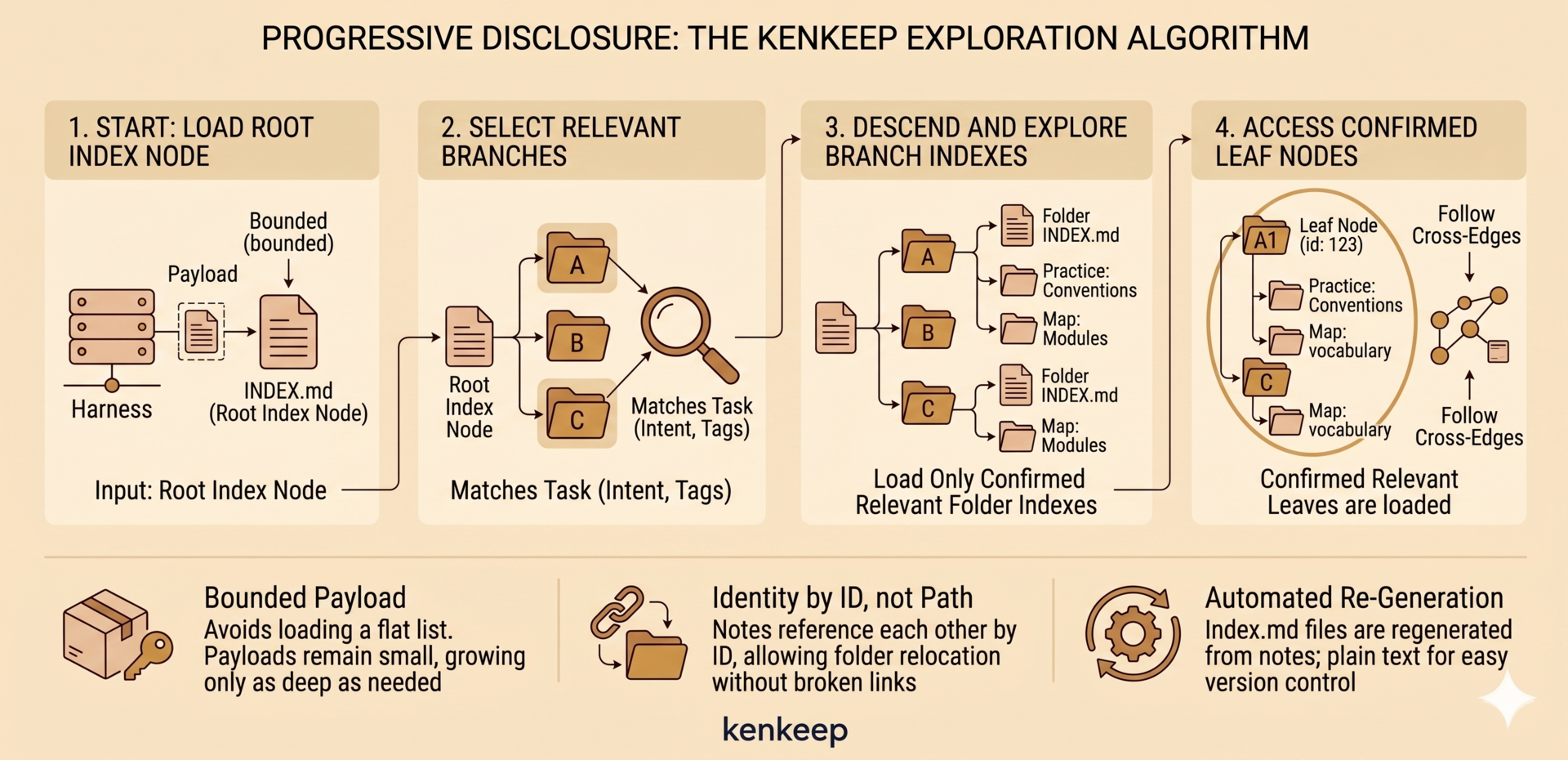
At the start of every session a hook injects the knowledge base back into your assistant — like capture, you don’t run it. It injects only the entry catalog (ENTRY.md, the catalog of top-level branches), never the whole base, plus a directive to descend by relevance. This is progressive disclosure: the assistant reads the root, picks the branches whose intent and tags match the task, and opens only the leaf notes it needs, following relates_to / depends_on cross-edges to related notes in other branches. The injected payload stays small no matter how large the knowledge base grows.
What’s stored
Every kept fact is a markdown file (a leaf node) under nodes/, in a tree of topical folders. Each note has a kind:
- Practice: how we build. Conventions, prohibitions, gotchas.
- Map: what exists. Modules, services, vocabulary.
kind is a label, not a location — folders are topical. Every folder also has a generated index.md (an index node): an actionable table-of-contents with verb-first Load … (descend) and Open … (read a note) pointers that splice in each target’s one-line summary, an embedded “how to descend” directive, a parent breadcrumb, and a “By topic” section pointing at the most relevant notes per tag — and no bookkeeping statistics. Each folder’s summary is a one-line description carried in its index frontmatter and preserved across rebuilds; it is written only when the LLM clusters folders (during migrate or rebalance) or by hand. Notes link by id, never by path, so a note can move without breaking a reference. GRAPH.md is the cross-reference graph the harness reads on demand. The index.md files regenerate automatically; everything is plain text, diffable and version-controlled like any code. Full frontmatter shape: Schemas.
For how the AI actually runs inside your harness session, see Internals, Architecture.